
[ THE MULTIMODAL PIPELINE ]
There you are on ChatGPT, typing this prompt into the AI to find an answer.
You’ve just finished the hard part. All your images are done. You’ve exported them as a slide deck. The visuals are stunning. They educate your audience. They’ll do a job in the post.
But they’ll never show up on Google’s Image Search. Because now your second job begins: the chores of converting and annotating these images for SEO optimization.
You truly dread what comes next:
- Export the images.
- Convert them to WebP.
- Rename every file into a clean slug, one-by-one.
- Upload them to WordPress.
- Write the alt text, one-by-one.
And you don’t even bother with the caption because you are already tired of the task before the page is even finished.

PROMPT INJECTION // PLATFORM_DRAG
“I’ve Already Made the Visuals. So Why does Publishing Them Still Feel Like Such a Chore?”
[ PRODUCTION DIAGNOSTIC: THE MEDIA LIBRARY CHORE ]
The Momentum Vampire: Dragging high-fidelity slide decks through manual conversion loops while your publishing drive flatlines.
You can feel the momentum leaving the room. The work is no longer strategic. It is mechanical, repetitive, and just annoying enough to make you delay the visual layer altogether.
You’ve already done the expert work. You’ve already created the post and the visual assets. You should not have to lose publishing momentum to machine chores just to make your own visuals usable on the web.
The ContentOps SlideShift platform is built specifically for that moment. It removes the annoying middle layer between finished visuals and publishable assets so you can move faster without lowering the standard.
Interactive SlideShift Simulator
Simulate the automated conversion of a visual asset. Drop a dummy PDF filename below to observe our automated generation of slugs, high-resolution WebP compression, and Didactic Alt-Text.
Processing Stream Logs:
The Chat with GPT continues…
Why Standard Visual SEO Planning is Broken
How do I turn a batch of images into web-ready assets without doing everything manually?
You need more than a place to store the files. You need a workflow that removes the repetitive production chores between finished visuals and publishable assets. In doing so, you don’t just save hundreds of hours of manual labor—you transform flat, unindexed graphics into search-dominant entities. By optimizing the code-layer delivery, SlideShift ensures that LLM-driven Answer Engines natively ingest your diagrams, using them as primary visual context sources to satisfy competitive search intents.
Why is publishing slide visuals still such a tedious chore after I already made them?
Because the hard part is already done, which makes the remaining work feel even more insulting. You already created the framework, designed the slide, built the comparison, or explained the process visually. What is left is not creative work. It is a string of repetitive production chores that slow everything down: exporting, converting, renaming, uploading, annotating, and repeating the whole cycle. When you get stuck in this manual grind, you don’t just lose momentum—you bury your visual assets where Google Image Search and RAG crawlers will treat them as dead layout pixels, leading to absolute visual invisibility.
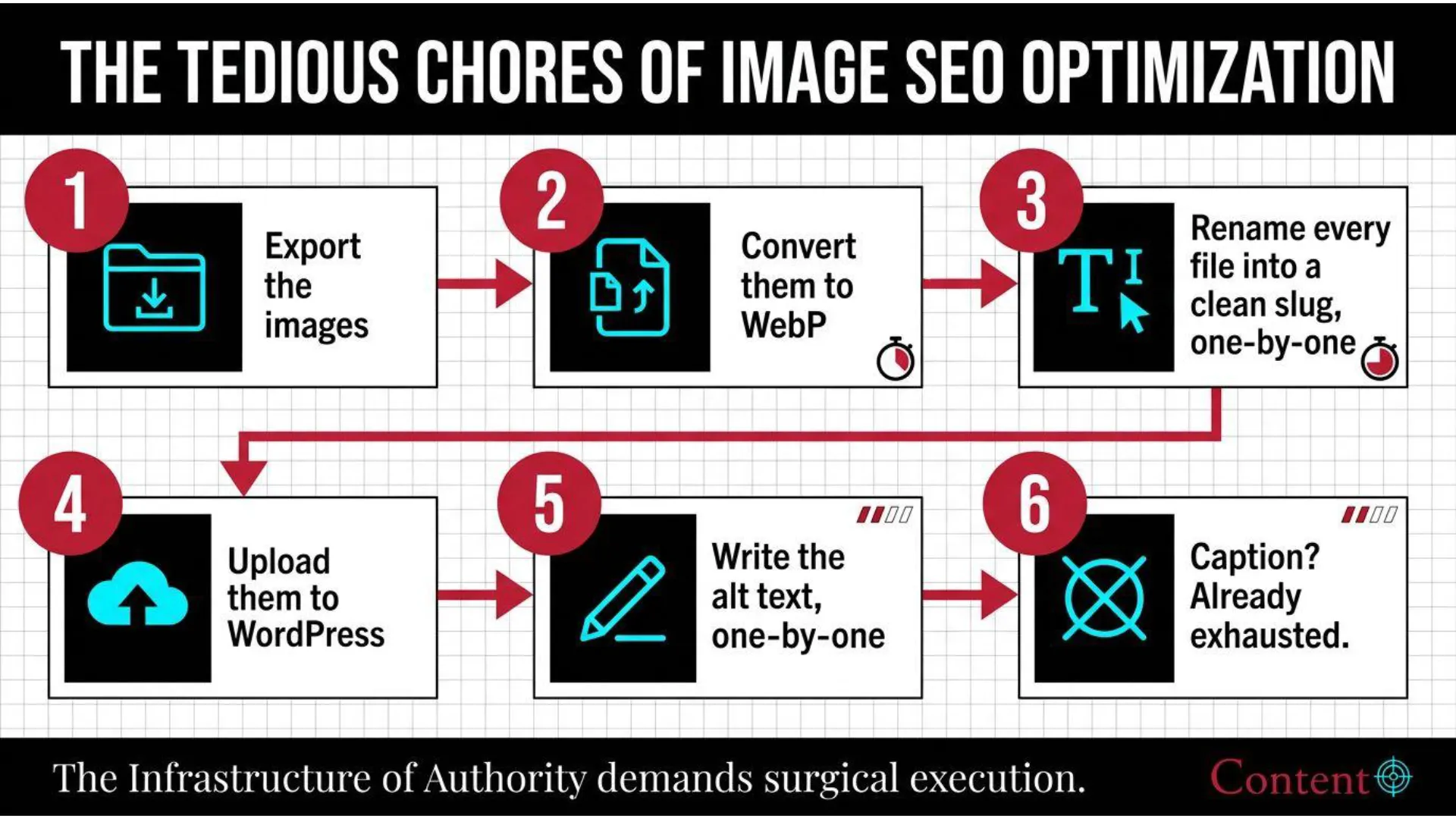
Figure 1: The manual media workflow. Dragging high-fidelity slides through repetitive WordPress chores kills your publishing velocity and leaves visual assets unindexed.
What part of the process actually creates the most friction?
The friction rarely comes from the visual itself. It usually shows up in the repetitive cleanup layer around the asset: format conversion, filename cleanup, upload prep, alt text generation, and the general handling of multiple files without losing consistency. That is the point where a strong visual stops feeling like a strategic asset and starts feeling like a publishing burden.
Why does this process feel so tedious in the first place?
Because the work is fragmented into too many tiny steps. None of them are intellectually difficult, but all of them chip away at momentum. By the time the images exist, you still have to force them through a manual sequence before they can live on the page. That fragmentation is what makes the process feel heavier than it should. The issue is not complexity. It is production drag.
The Problem Is Not the Visuals. It’s the Manual Production Chain Around Them.
What do you mean by “web-ready assets”?
A web-ready asset is not just an image file that exists. It is an image that is light enough for the web, named cleanly, formatted for publishing, easy to upload, and semantically usable the moment it lands in your workflow. When you establish this level of data hygiene, your image files stop behaving as empty pixels and begin operating as structural context arrays that force search engine and AI agent indexation.
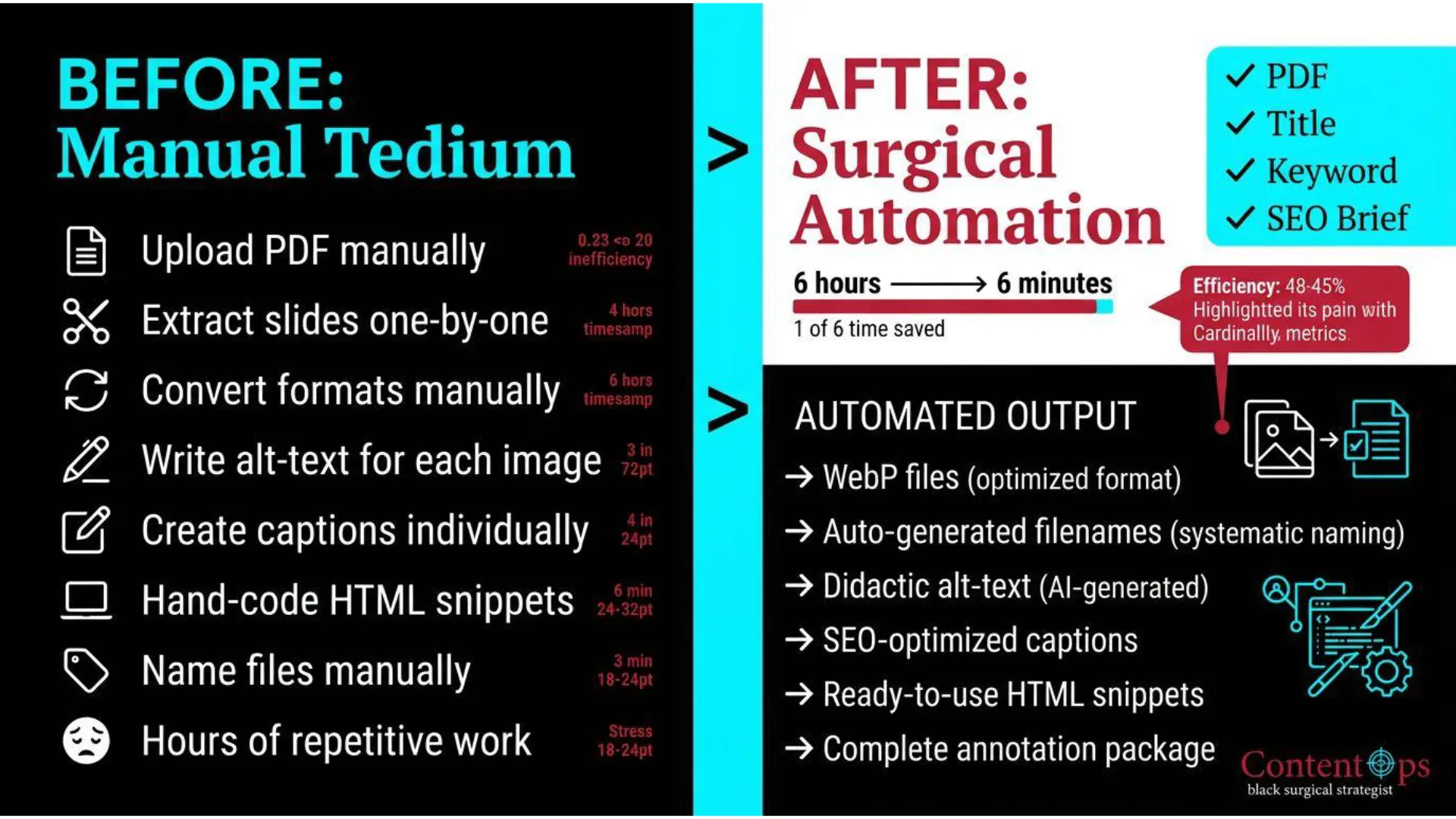
Figure 2: The before-and-after of media integration. Collapsing the manual WordPress media library loop into an automated, system-driven calibration pass.
So is this mainly a file-conversion tool?
No. File conversion is only one piece of the problem. SlideShift is a visual publishing accelerator. It automates the extraction of raw presentation decks, compresses them into lossless WebP files, assigns topical slug parameters, and writes descriptive didactic alt-text in one continuous pipeline. It ensures your visual content is highly performant, lightning-fast to load, and completely prepared to claim visual real estate in generative search results.
Why can’t I just upload PNGs and move on?
Because shortcuts are usually where quality starts to decay. That approach often leads to heavier files, messy filenames, inconsistent annotations, skipped metadata, and a visual layer that is technically present but operationally sloppy. The page may still go live, but the process becomes inconsistent and the assets contribute less than they should. SlideShift matters because it makes it easier to move quickly without defaulting to sloppy execution.
Why do filenames matter so much?
Because filenames are part of media hygiene. When names are left messy, inconsistent, or filled with export junk, the workflow starts to feel improvised instead of systematic. Clean, slugified naming helps keep files organized, reduces cleanup friction later, and reinforces the sense that your publishing workflow is built rather than patched together. Learn more about structural optimization in the [ Publishing Accelerators Step 2 Guide ].
The Anatomy of Multi-Modal Image SEO
Is the real value here speed, or is it quality?
It is both, and the two are tightly connected. Speed protects quality. When visual optimization is manual, operators take shortcuts: they skip alt-text, leave filenames raw, and abandon descriptive captions entirely. SlideShift delivers both by automating high-fidelity alternative descriptions directly from your visual layout frames. This ensures every graphic possesses the didactic relevance required to force search engines to trust your assets for competitive visual snippets and AI overview citations.
The third element of value is the opportunity. So many of your competitors ignore this chore for the same reasons you used to: they don’t know how or the workflow is just too tedious. By using SlideShift as part of your publishing sprint, you give yourself the chance to achieve image search dominance. You can colonize the top rows of Google Image Search, turning your blog post images into billboards that can drive you traffic and increase your post’s SEO signals.
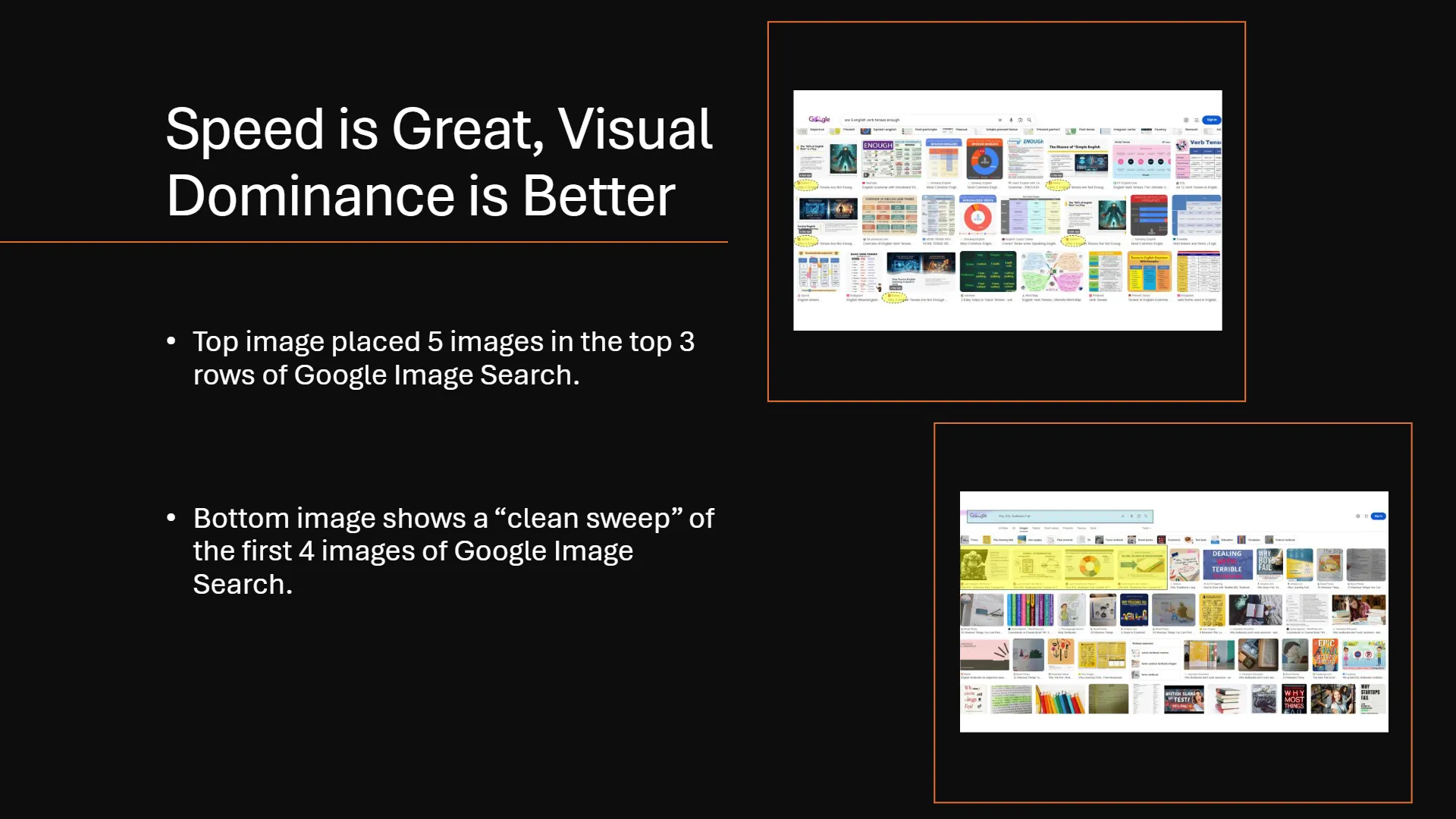
Figure 3: True visual dominance in search results. Placing structured, highly annotated didactic diagrams across the top rows of Google Image Search to hijack organic clicks.
What happens when this workflow is not fixed?
Usually one of three things happens. The images never get published because the task feels too tedious. They get published sloppily, with weak hygiene and rushed annotations. Or the visual layer stays thinner than it should, which leaves the page with less teaching power, less clarity, and less differentiation than it could have had. The cost is not just inconvenience. The cost is weaker execution.
Isn’t alt text the most annoying part of the whole thing?
For many operators, yes. By the time they have exported the files, converted them, renamed them, and uploaded them, writing image descriptions can feel like one chore too many. That is why it gets rushed, simplified, or skipped. But when the visual is genuinely didactic, such as a framework, process slide, chart, or comparison, the annotation matters more than people think.
To learn how to structure this context, read the [ SlideShift Image Dominance Guide ] to understand how SlideShift automates didactic alternative descriptions directly from your layout frames.
Why does semantic annotation matter for visuals?
Because a visual is not just decoration when it contains meaning. If an image teaches, compares, explains, or maps a process, that meaning should not disappear the moment the file gets uploaded. Semantic annotation helps carry some of that meaning into the web layer, which strengthens accessibility, clarity, and machine readability. That makes annotation more than a compliance task. It becomes part of the page’s communicative structure.
SlideShift Accel: Four Methods of Visual Dominance
[ Pipeline 01 ]
Batch WebP Compression
Automatically converts raw PNG or PDF decks into optimized, lightweight WebP assets. Slashes rendering payload and avoids the RAG Compute Tax without degradation of high-contrast presentation lines.
[ Pipeline 02 ]
Deterministic Slug Generation
Strips messy export strings from your filenames and auto-slugifies them into clean semantic parameters based on your Topical Map. Replaces chaotic directory names with clear, crawlable structural keywords.
[ Pipeline 03 ]
AI Didactic Alt-Text Extraction
Uses multimodal vision to scan your diagrams and extract the logical flow. Instantly writes deep, contextual descriptions representing the visual’s purpose to secure image overview citations.
[ Pipeline 04 ]
Semantic HTML Chassis Output
Outputs a ready-to-paste pure HTML container block holding the WebP layout, alt layers, and a stylized semantic caption, allowing you to bypass WordPress media dialogs completely. Review our [ HTML Ingestion Wrapper Guide ] to optimize code delivery.
SlideShift Is One Part of a Bigger Content Manufacturing Line
How does SlideShift connect to the bigger ContentOps idea?
ContentOps is about removing the friction between expertise and publishable output. In this case, the expertise has already been visualized. The missing piece is the operational bridge that takes a finished visual asset and turns it into a clean web asset that can live on the page fast. SlideShift handles that bridge. It turns a repetitive asset-prep job into a smoother, more repeatable production step.
We frame our publishing accelerators as tools that turn manual formatting and image chores into a faster manufacturing-line sprint, while our master Expert AI Content System positions SlideShift pipelines as part of a repeatable AI content manufacturing line. To review the block reassembly system, study our [ HTML Splitter Blueprint Manual ].
What makes this better than just outsourcing image prep?
Delegation still requires a process. If the workflow is manual, then whether you do it or someone else does it, the system is still inefficient. SlideShift improves the workflow itself. That means less handoff friction, fewer repeated steps, cleaner consistency, and a more scalable visual publishing process. It is not just about saving time. It is about designing out a bad workflow.
Why does this belong inside a content operations workflow, not just a media workflow?
Because this is ultimately about repeatability, leverage, and output quality. Media handling is only one step, but it can easily become the step that slows everything down. When the bridge between visual asset creation and page-ready publishing is strong, the entire content system becomes easier to operate. That is why SlideShift belongs inside a manufacturing-line model instead of being treated as a throwaway utility.
Manual WordPress Chore vs. SlideShift Ingestion
| Process Step | Manual WordPress Chore | SlideShift Ingestion Pipeline |
|---|---|---|
| File Optimization | Manual PNG-to-WebP exporter routines. | Batch automated compression via the WebP Conversion Engine. |
| File Naming Directory | Typing file names manually one-by-one. | Automated slugification matching your active Topical Map. |
| Semantic Alt-Text | Vague descriptions stuffed for lexical vanity. | AI-generated Didactic Alt Text explaining structural context. |
| WordPress Integration | Manually clicking “Upload -> Add Description” 15 times. | Copy-and-paste Pure HTML Chassis widget blocks in seconds. |
If you want a stronger visual layer, you need a better publishing workflow.
🧱 The Hindsight Insight (The Architect’s Regret):
“If I had to do it all over again, I would stop treating image publishing like a minor cleanup task and start treating it like part of the production system. I would not wait until the end of the page to deal with exports, conversions, renaming, uploads, and alt text. And I would not keep letting that final batch of repetitive chores decide whether the visual layer actually made it onto the page. That is what SlideShift is built for. It takes the visual work you already did and helps you move it through the system without turning the last mile into a chore.”
Stop babysitting image chores. Start publishing stronger visuals for free.