
Looking for the free structural MRI? →
Run it free at audit.contentops.so
The ContentOps Audit Suite is an on-page SEO audit tool that reads your raw HTML — not your prose — and returns a structural diagnosis with copy-paste code fixes for every problem it finds. No checklist. No SEO score. A repair brief that tells you exactly what is broken at the code level and how to fix it.
The Inward Panic of the Content Treadmill
You know the feeling. You’ve slaved over a piece of content for days. You followed the generic checklists, got the green lights from your plug-ins, and hit publish.
Yet hours later, you are sitting alone in the dark, refreshing search console reports, watching your positioning drift into the back pages of the index. In desperation, you turn to LLM wrappers to debug a structural rot they cannot see.

“My on-page SEO plugin says this page is fine… so why is it still stuck on page 2?”
“I followed the checklist. I hit publish. Why is this still not ranking — and how do I actually fix it?”
[ PATHOLOGY DETECTED: THE COMPLIANCE CATASTROPHE ]
Symptomless Death in Action: Satisfying the Checklist Golem’s arbitrary green light metrics while the actual semantic spine is left completely broken.
// CLINICAL SCANNER LOG:
PATHOGENS LOCATED
Your page-builder wrapped your text in 34 nested layers of div wrappers. AI crawlers have abandoned ingestion due to high compute cost.
Found a missing H2 block between H1 and H3. The structural semantic skeleton is broken.
You drop advanced terms in text without building dedicated pages to back them up, creating structural amnesia.
Your link routes use “click here” and “read more” instead of passing deterministic contextual data to related nodes.
Redirecting structural assets to the core PLG console…
At this point, you are not a beginner at SEO. You’ve already done the work, written the post, and optimized it according to your on-page SEO checklist tool.
And yet the result still feels wrong. The page looks polished on the surface, but the execution under the hood at the HTML level can still be quietly sabotaging the outcome. You have hidden pathogens preventing your page from reaching its true potential with a duplicate H1, skipped headers, vague headers and anchor text, missing images, no alt-text layer, weak structural signals hiding inside the HTML.
That is where the Green Light Gaslighter fails you.
It tells you whether you satisfied a checklist, but it doesn’t look at the code and comment on the quality of your post’s semantic signaling. Nor, does it tell you exactly what to do to fix it.
You just work on your post, making minor tweaks until it hands you a reassuring score or a green light. Yet the signals that actually matter remain invisible and your post unindexable (or worse, on the cusp of the first page with no roadmap to get it across the line).
The ContentOps Audit Suite is built for that exact moment. Not to hand you another failure checklist, but to generate an actionable, context-aware fix-it brief: “Here’s what is wrong; here’s why; and here’s how you fix it fast.”
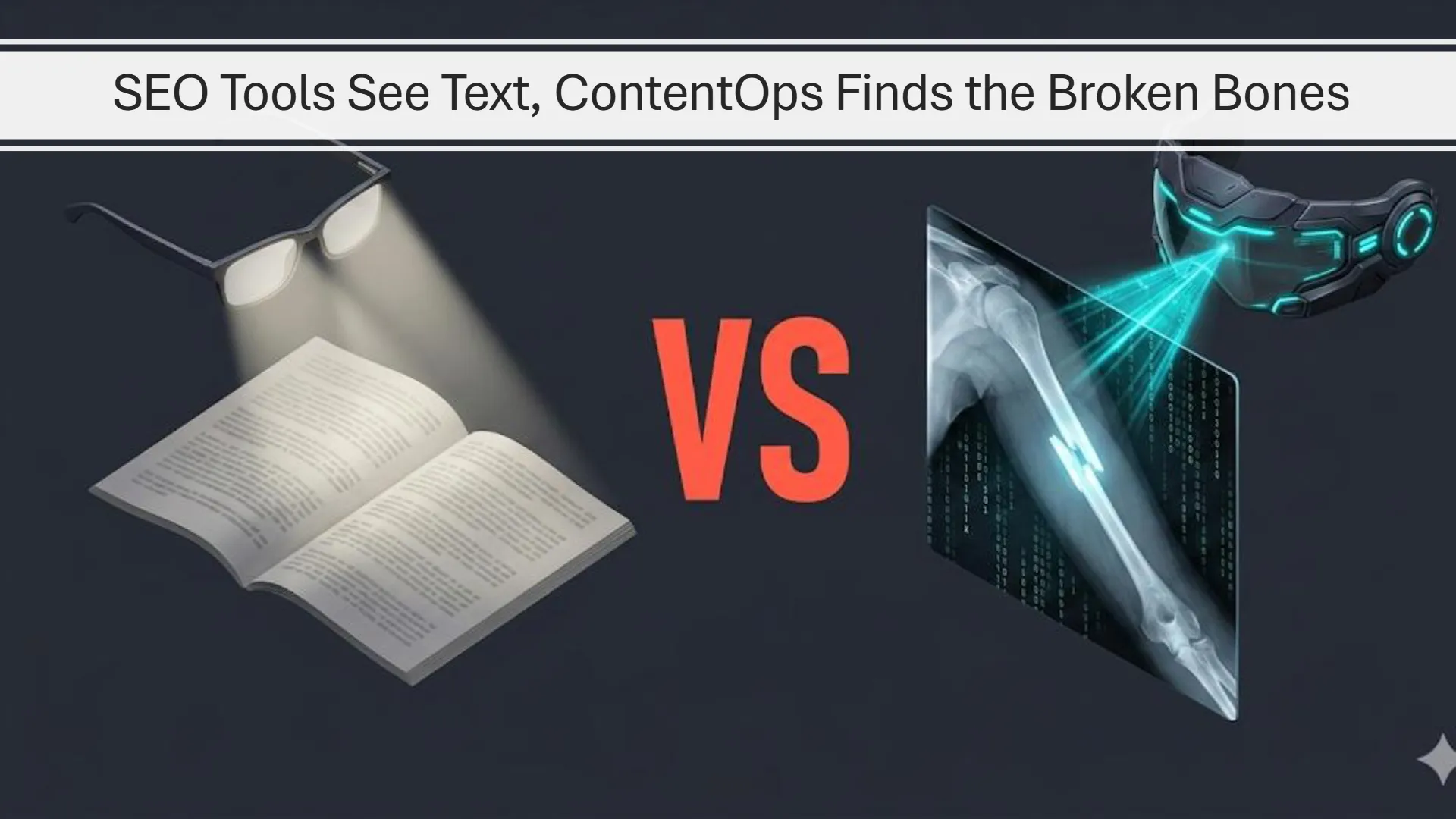
[ SLIDESHIFT VISUAL 1: STRUCTURAL SEPARATION ]
Orthopedic Diagnostic Delta: Why standard checklists only review readability strings while ContentOps locates literal breaks in the page’s code structure.
Why Most On-Page Audits Leave You Guessing
Why do most on-page audits still leave the operator confused?
Because most audits produce information without producing clarity. They surface scores, warnings, massive issue lists, and generic optimization advice, but they do not tell the operator what actually matters, what is broken first, or what specific action should be taken next. That leaves the page owner with another report to decode instead of a real path forward. For a detailed breakdown on diagnosing invisible ranking stagnation, read the [ Publishing Accelerators Hub Manual ].
Why is a page often weaker than it looks on the surface?
Because the visible copy can seem fine while the underlying structure is doing a poor job of supporting it. A page may look “polished,” but still be weaker than it should be because the heading structure is drifting, the internal links are vague, the supporting pages are missing, the semantic anchor points are under-optimized, or the article is not properly wired into the rest of the site. Review our [ HTML Ingestion Wrapper Blueprint ] to align structural elements natively.
Why is structural clarity more useful than another SEO score?
Because a score can tell you something is off, but it usually cannot tell you why the page feels broken or what should be fixed first. Structural clarity goes deeper. It reveals whether the hierarchy is clean, whether the page’s semantic spine is intact, whether key sections are doing their job, and whether the content is carrying its weight in the places that matter most. That is much more useful than another abstract number.
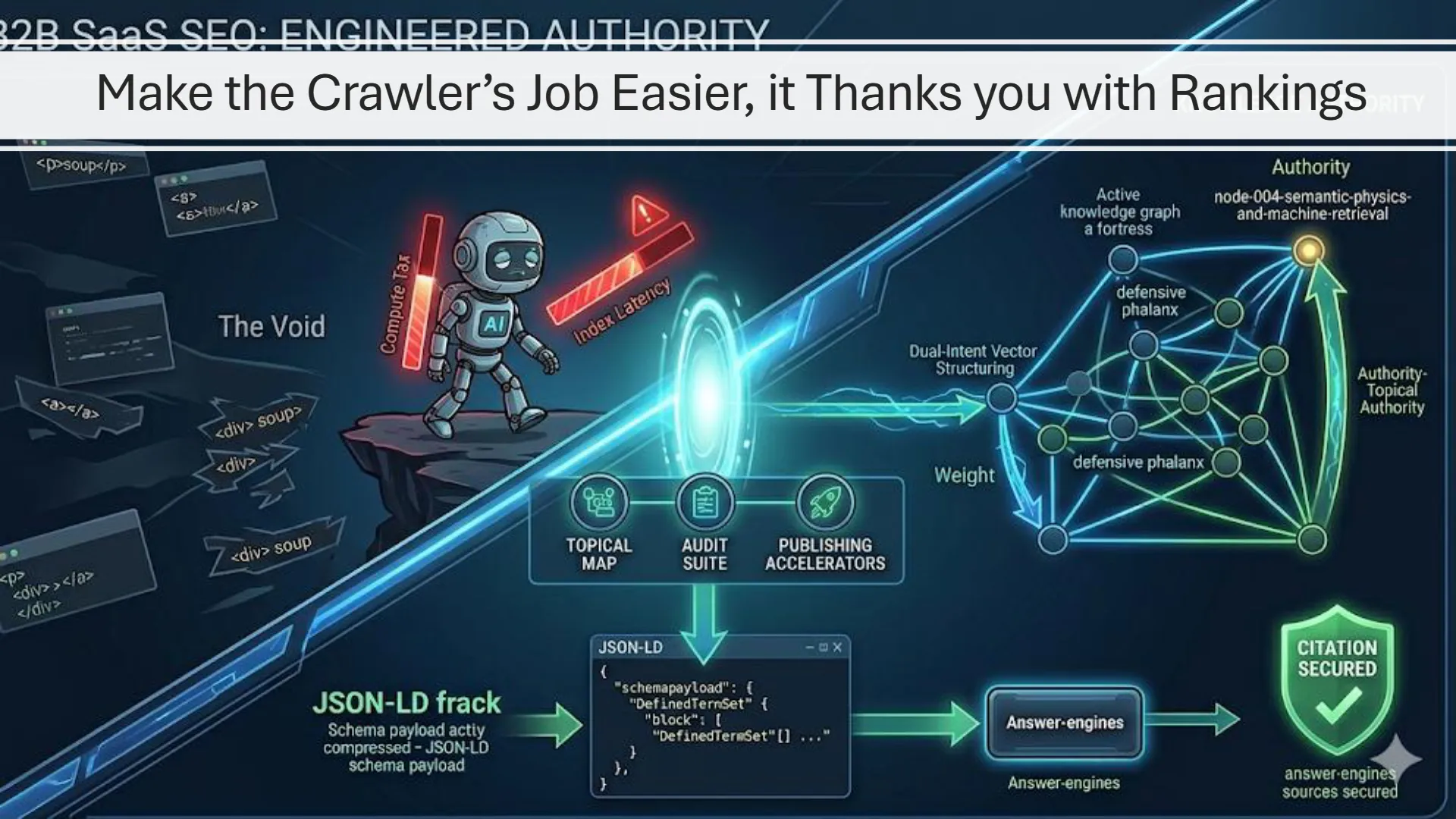
[ SLIDESHIFT VISUAL 2: THE COMPUTE TAX DEFENSE ]
The Cost of Chaos: Messy JS structures and un-linked pages trigger RAG crawl abandonment. A structured knowledge graph drops parser latency to absolute zero.
What the ContentOps Audit Suite Actually Solves
What problem does the Audit Suite solve that checklists do not?
The Audit Suite identifies where the page is structurally weak at the HTML level instead of telling you whether the page “passes” a generic checklist. The Audit Suite tells you if your post is contextually unsupported, poorly linked, underdeveloped, or strategically vulnerable. Most operators do not need another dashboard of vague green lights. They need to know why the page is underperforming and what the next best move is. The Audit Suite turns raw analysis into practical missions instead of passive reporting.
What makes the Audit Suite superior to a normal on-page SEO audit tool?
Most SEO audit tools focus on broad technical scanning, issue lists, and generic optimization categories. The Audit Suite differs in that its diagnostic parses the HTML you give it and exports the traditional metrics, the header map, the links along with their anchor text, and the image alt text and encapsulates all of that into a text file that works as a context injection for AI. That data is passed to an AI who reads your HTML as Google’s crawlers or AI Answer Engines read your HTML. The report you get is far more specific as to what is broken, what you need to fix, how you fix it, and where to perform the fix. It goes much farther and deeper than any on-page SEO audit tool or plugin does.
What is the real promise of the Audit Suite?
The real promise is not more data. It is more clarity. It helps the operator see what is actually wrong with the page, where the page is disconnected, what structural issues need fixing, what support it lacks, where expansion is possible, and how to out-position competing content more intentionally. That is what makes it valuable. It turns uncertainty into a plan. For the full engineering guide on resolving code-level blockages, study our [ Modular HTML Splitter Blueprint Manual ].
What the Diagnostic Tool Measures
What does the diagnostic tool actually measure?
The diagnostic tool measures the structural and semantic anchor points that carry disproportionate ranking weight. At the basic level, it checks things like the H1, the page’s word count, keyword density, and whether the target phrase appears in the first 100 words.
But the more important layer is what it measures beyond those basics. It maps the page’s header structure, checks for skipped levels, reviews the anchor text used in links, and evaluates image alt text. These are not neutral formatting details. They are semantic force multipliers.
Why are headings, anchor text, and alt text such an important part of the audit?
Because search engines and AI retrieval systems do not evaluate a page as one flat block of text. They place greater weight on certain semantic anchor points. The H1 carries more significance than a body paragraph. H2s and H3s reinforce the spine of the argument. Anchor text routes authority and meaning into linked pages. Alt text turns visual assets into machine-readable signals instead of dead space. If those areas are vague, weak, or structurally inconsistent, the page leaves a large amount of semantic leverage on the table.
What do you mean by semantic force multipliers?
Think of the page as having zones of amplified influence. The H1 carries more force than ordinary copy. Each H2 and H3 strengthens the semantic skeleton of the article. Outbound anchor text does more than create a link — it routes context and authority. Alt text helps visual assets contribute to the page’s machine-readable meaning. So while the multiplier values are conceptual rather than literal, the principle is simple: not every word on the page carries equal force. Some locations multiply the impact of the language they contain. If those anchor points are weak, the page loses a great deal of potential strength.
Why does the heading spine matter so much?
Because the spine is the page’s semantic skeleton. If the heading hierarchy is clean, the page becomes easier for readers, search engines, and AI systems to interpret. If the spine is broken — duplicate H1s, skipped heading levels, vague subheads, or weak hierarchy — the structure becomes harder to trust and harder to process efficiently. That is why the diagnostic tool maps the header structure directly. It is not just checking whether headings exist. It is checking whether the page’s semantic skeleton is carrying the argument properly.
Why does the audit care about anchor text so much?
Because anchor text is not just a clickable phrase. It is a routing signal. When the page links outward using vague language like “click here,” “read more,” or “get started,” it wastes an opportunity to pass context and reinforce the relationship between pages. Strong anchor text helps route meaning, strengthen the relevance of the destination page, and clarify why the connection matters. That is why the audit looks closely at anchor text. Weak anchors are not just a style problem. They are a missed force multiplier. Learn how to optimize anchor routing natively in the [ SlideShift Image Dominance Guide ].
Why does alt text matter beyond accessibility?
Because alt text is one of the semantic anchor points that helps explain visual assets to machines. If an image has no alt text, or only vague alt text, it contributes far less to the contextual strength of the page. Optimized alt text helps tie the visual layer back into the page’s topic, entities, and supporting ideas. That matters more now because AI systems place greater weight on structured, machine-readable signals across both text and media. So the audit is not just asking whether images exist. It is asking whether they are contributing meaningfully to the page’s semantic force.
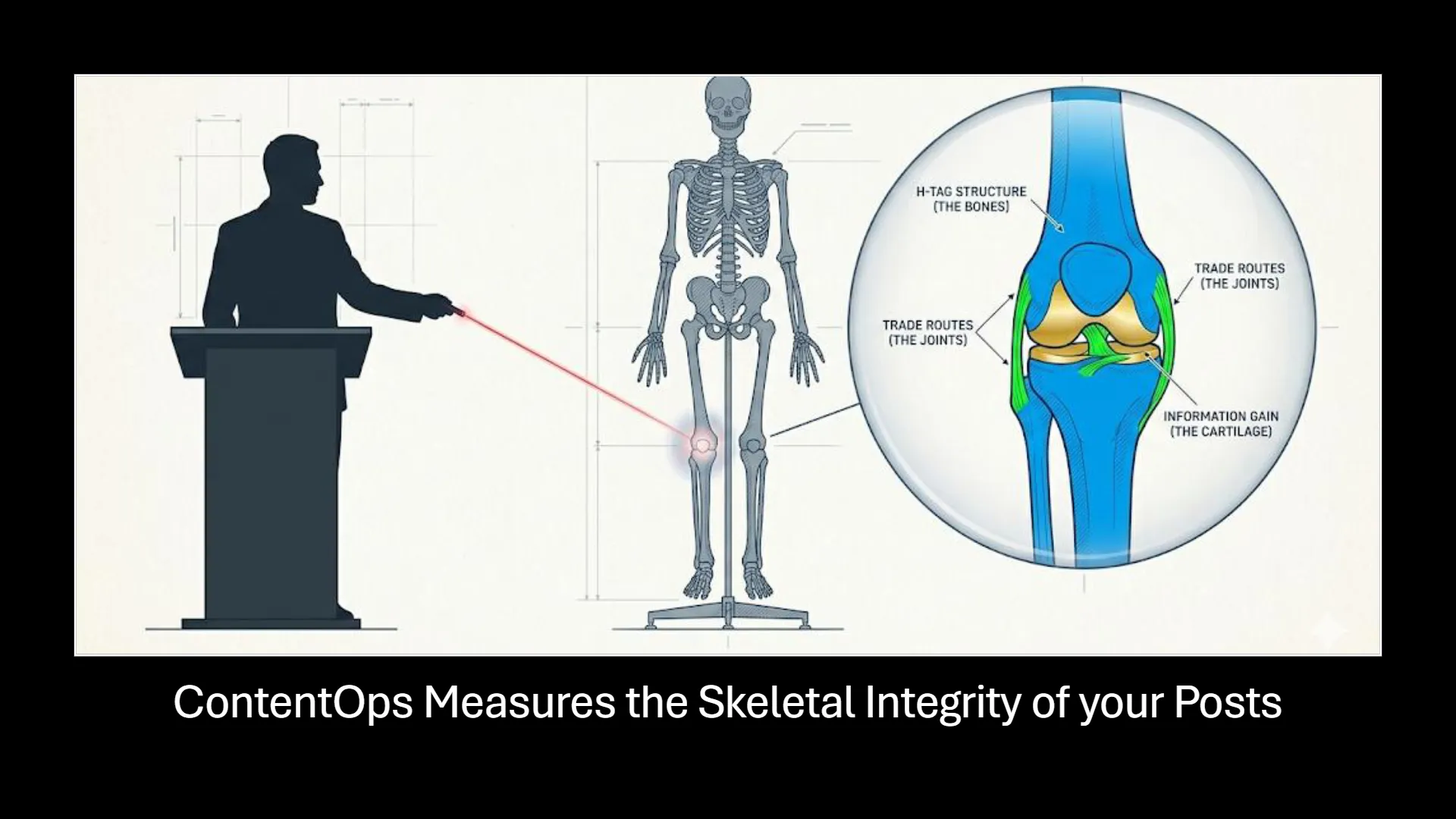
[ SLIDESHIFT VISUAL 3: CONTENT ORTHOPEDICS ]
The Bones of SEO: Your head tag hierarchy is the skeletal spine. If the joints (trade links) or cartilage (un-copied expertise) are missing, the structure collapses.
How the Audit Suite Turns Diagnostics Into Action
How does the Audit Suite turn analysis into action?
It turns the page into a sequence of practical missions instead of leaving the operator with a passive report. Rather than saying, “Here are your issues,” it says:
- this is where the structure is weak
- these are the pages you should link out to
- these are the pages that should be linking into this one
- these are the concepts missing from your map
- this is where a competitor is out-positioning you
That is the core shift. The output is meant to drive action, not just observation.
Does the Audit Suite just produce a report, or does it generate a real fix-it brief?
It generates a real fix-it brief. The diagnostic tool first measures the page’s structural and semantic condition. Then that diagnostic data is passed together with the page’s HTML into the AI layer, which produces a more complete improvement brief. That means the operator does not just get metrics. They get context-aware guidance on what to change and why those changes matter. The diagnostics feed directly into action.
What makes the Broken Bones Brief so important?
The Broken Bones Brief matters because it translates structural weakness into a repair roadmap. It does not just say that the page has problems. It shows where the semantic skeleton is broken, where leverage is being wasted, and where stronger headings, anchors, or image support could produce a much greater force-multiplier effect. It gives the operator a practical sense of what stronger structure is worth. That is why the brief is more than a diagnostic summary. It is the page’s repair plan.
What the Five Missions Actually Do
The Audit Suite breaks the diagnostic process into five targeted, problem-solving paths. Every mission generates a deterministic execution brief to align code with AI retrieval logic.
Bones Scan
Internal Structural Integrity
Exposes the structural flaws in the page itself — duplicate H1s, broken header hierarchy, empty elements, and code-level bottlenecks (Div Soup). It identifies exactly where your post’s physical framework fails to support your ideas, creating the diagnostic roadmap for repair.
Anchor Path
Outbound Authority Link Route
Scans your live post’s outbound anchor text to eliminate generic phrases like “click here” or “read more.” Maps your output against your primary JSON Topical Map to recommend precise destination coordinates that pass clear, contextual authority.
Inbound Weld
Inbound Phalanx Assembly
Reverses the link-building paradigm. Scans your existing archive to find older, high-authority “continent” pages that should be linking down to support your new or stalled node. This ensures authority flows smoothly without manual index searches.
Gap Mine
Concept Map Expansion
Extracts unsupported “Shadow Concepts” from your content. Locates deep, high-value entities that you mentioned in passing but never backed up with dedicated pages, instantly generating the blueprint for your next node creation.
Adversary Raid
Adversarial Gap Analysis
Deploys a side-by-side diagnostic scrape of your draft versus the top-ranking Goliath page. It doesn’t look at keyword counts — it looks at structural hierarchy, identifying exactly where they have deeper support and where your structure can cut under them.
Why the Audit Gets Better When It Uses the Topical Map
Why is this better than auditing a page in isolation?
Because pages do not exist in isolation. They live inside a wider content ecosystem. A page might look good enough on its own, but still be weak because it is poorly supported by related content, disconnected from the rest of the site, or missing the cluster structure that gives it real contextual weight. The Audit Suite becomes much more powerful when it can compare the page against your Topical Map for Semantic SEO instead of judging it as a lone asset. That is why it can recommend link opportunities, support pages, and expansion paths that a standalone checklist never could. Learn how to coordinate these structures by studying the [ Miyagi Method & Publishing Flow Guide ].
How does the Audit Suite use the topical map to make better recommendations?
The topical map gives the Audit Suite a source of truth for the wider content system. Instead of auditing one page blindly, the system can compare the live HTML against the known structure of your site: the nodes, clusters, related pages, internal relationships, and mapped concepts. That means it can suggest internal links more precisely, identify missing support more intelligently, and surface expansion opportunities that are grounded in your site’s actual content architecture.

[ SLIDESHIFT VISUAL 4: SYSTEM-WIDE SENSING ]
The Global Map Advantage: Don’t audit pages as isolated files. Connect them directly to your master JSON Topical Map to feed AI agents a complete, un-erased memory.
Why It Matters Before and After Publishing
Who else is the Audit Suite for besides the owner with a backlog of weak pages?
It is also for the operator who wants to publish optimized content from the start. The Audit Suite is not only a rescue tool for old posts and legacy pages. It is also a quality assurance layer for new drafts before they go live. That means the operator can use it to catch structural weaknesses, weak anchors, thin semantic support, and missed linking opportunities before the page ever enters the site.
How does the Audit Suite help both old content and brand-new drafts?
It works at both ends of the workflow. For older content, it helps the operator understand what is already weak, under-supported, structurally broken, or losing ground to competitors. For new content, it acts as a pre-publish quality check. The operator can run the wrapped HTML draft through the diagnostic process, spot issues early, and strengthen the page before it goes live. That makes the Audit Suite useful whether the question is “what is wrong with this page I published months ago?” or “how do I make sure this draft is stronger before I hit publish?”
Why does this matter for someone publishing new content today?
Because the easiest time to fix a weak page is before it goes live. If the draft already has a wrapped HTML structure, the operator can run diagnostics early, catch broken hierarchy, improve anchors, tighten key semantic points, and publish a page that is stronger from the beginning. That means the Audit Suite is not only about repairing damage. It is about preventing weak structure from becoming baked into the site in the first place. That is what makes it a true quality assurance layer for modern content operations.
Why Founder-Operators and Content Teams Care
Why is this especially useful for founder/operators?
Because founder/operators usually do not have time to decode vague audit reports. They do not want another PDF full of passive observations. They want clarity. They want to know what is wrong, what matters most, what to fix first, what to build next, and how to stop losing ground to pages that are structurally stronger. The Audit Suite reduces that cognitive load by turning analysis into a clearer sequence of actions.
Who is this really for?
It is for the founder, operator, strategist, or content team that already has content live but is tired of guessing why certain pages still feel weak, disconnected, or underpowered. It is also for the operator who wants a stronger pre-publish quality check before new content goes live. If the frustration is no longer “I do not know what to publish,” but “I do not know what is wrong with what I have already published,” or “I do not want this new page to launch weak in the first place,” then the Audit Suite is solving the right problem.
Spreadsheet Compliance vs. Forensic MRI
| Analysis Parameter | Traditional Checklist Golem | ContentOps Audit Suite |
|---|---|---|
| Auditing Boundary | Isolated node evaluated with zero site context. | System-aware audit compared directly against your active Topical Map. |
| Diagnostic Output | Abstract “SEO Score” that hides structural bugs. | A prioritized Broken Bones Brief identifying exact skeletal repairs. |
| Code Pathogen Scan | Reads text only, ignoring rendering layout costs. | Forensic scan of raw HTML to expose Div Soup Pathogens. |
| Internal Link Engine | Passive warning: “Add 3 internal links.” | Surgically maps incoming/outgoing nodes to construct an unbroken Phalanx. |
| Gap Extraction | Basic keyword density matching averages. | Extracts competitor’s unsupported Shadow Concepts and missing Jenga blocks. |
See how the Audit Suite compares to Screaming Frog and Ahrefs in a full structural comparison →
[ FREQUENTLY ASKED ]
Common Questions About the Audit Suite
Is the ContentOps Audit Suite a free on-page SEO audit tool?
Yes. The free version at audit.contentops.so runs Mission 1 — a full structural spine and semantic HTML diagnosis on any page URL. No account required. Paste your URL and get your Broken Bones Brief. Missions 2–5, which cover outbound linking, inbound authority routing, Shadow Concept extraction, and competitor gap analysis, are available inside the full ContentOps Mothership at app.contentops.so.
What makes this different from other on-page SEO audit tools?
Most on-page SEO audit tools read your text layer and return a compliance score. The ContentOps Audit Suite reads your raw HTML — the structural bones beneath the content — and returns a repair brief with copy-paste code fixes. Not a score. Not a warning list. A specific instruction for every structural problem found, including the exact location in the code and the exact fix to apply.
Can I use this as an SEO audit report and fix tool for client pages?
Yes. Paste any public URL — your own pages or a competitor’s. The Audit Suite generates a diagnostic report and a fix-it brief covering the page’s structural issues, semantic spine gaps, anchor text problems, and missing alt text signals. The output is exportable as a .txt file for client delivery or team briefing, making it a practical on-page SEO audit report and fix tool for consultants and agencies.
How do I fix my SEO audit report findings without a developer?
The Audit Suite generates copy-paste HTML fixes for every structural problem it identifies. You do not need to understand code to implement them. Each fix is labelled, explained, and ready to paste directly into your CMS HTML block or Elementor HTML widget. The fix-it brief tells you what is wrong, where it is in the page, and exactly what to replace it with — no developer, no guesswork.
Can the Audit Suite be used as an on-page SEO audit widget?
The free Audit Suite runs as a standalone browser-based tool at audit.contentops.so — no installation or embedding required. Open it in any browser, paste a URL, and run the diagnostic. For teams wanting the full five-mission suite integrated into their content operations workflow, the ContentOps Mothership at app.contentops.so includes the complete Audit Suite alongside the Topical Map Manager, SlideShift, and the publishing accelerators.
What does “SEO audit report and fix” mean in practice?
Most SEO audit tools produce a report. The ContentOps Audit Suite produces a report and a fix. The diagnostic layer identifies the structural problems at the HTML level — broken heading hierarchy, vague anchor text, missing alt text, div soup code bloat. The AI brief layer then translates those findings into specific, actionable repair instructions including copy-paste HTML, so you move directly from diagnosis to implementation without a second tool or a developer.
If you want stronger on-page SEO, you need a better fix-it brief.
🧱 The Hindsight Insight (The Architect’s Regret):
“If I had to do it all over again, I would stop wasting time with audit tools that only tell me whether I passed a checklist. I would stop treating green lights like proof that the page was strong. And I would stop guessing which issue mattered most every time a post stalled, slipped, or failed to break through. I would want a tool that showed me what was actually broken, where the weakness lived, and how to fix it without turning the audit into another research project. That is the point of the Audit Suite. It gives you a repair brief instead of another score, so you can stop decoding vague reports and start strengthening the page.”
Stop guessing. Get the fix-it brief. Move from passive observation into active, surgical repair.