
Alternative to SEMrush Writing Assistant: Text-Layer Scoring Beyond Real Structural Code
The SEMrush Writing Assistant scores your draft against readability, SEO term coverage, tone consistency, and originality, four real, well-built checks operating entirely on the text you’ve typed. When you look at how search crawlers and AI models actually process a page, none of that tells you whether the code underneath is structurally sound. We ran a live test on one of my own legacy pages to show exactly where that gap shows up.
SEMrush Writing Assistant: Why It Fits
The SEMrush Writing Assistant scores content across four real pillars: readability, SEO, tone of voice, and originality. It’s bundled inside the Content Toolkit, with native integrations for WordPress, Google Docs, and MS Word, and a genuine Brand Voice feature trained from sample text.
It works the way you’d expect from a mature, well-funded product. Paste or connect your draft, set a target keyword and readability level, and it returns a live percentage score with a ranked list of suggested edits, add this term, shorten this sentence, adjust this tone. It’s genuinely useful for what it’s built to do.
The Downside of Text-Layer Scoring
What it’s built to do is score prose. Search engines and AI models don’t read prose the way a person does, they read code. A readability percentage and a keyword-density check tell you almost nothing about whether your heading hierarchy is intact, whether your internal links are welded with real anchor text, or whether your images are teaching a crawler anything at all.
That gap isn’t hypothetical. We tested it directly, on a real page that’s been ranking and generating signups for months, run through both tools on the same day.
I Audited One of My Own Legacy Posts With SWA and ContentOps
The Post That Google Yo-Yoed
The test subject is a real, live page on my own site, “How to Learn Irregular Verbs Easily”. It once ranked #1 for exactly that phrase. Then an algorithm update shifted things. Google demoted the post far down the SERPs for the chosen keyword while raising it up the SERP for a separate keyword, “Irregular Verbs Learning Method.”
That is when I coined the term that Google was winking at me from across the room, in other words signalling I should realign the keyword to their stronger target. So, I semi-optimized the post with ContentOps’ newly created Audit Suite Tool, changing some of the structure, alt-text while leaving the meta data the same. I wanted to test that a post with good structure but poor mechanical compliance could still rank and get traffic. At the time of speaking, that post ranks seventh on page one, gets regular traffic, and has been my highest source of signups for my English learning blog.
SWA’s First Diagnosis, Without the Right Keyword
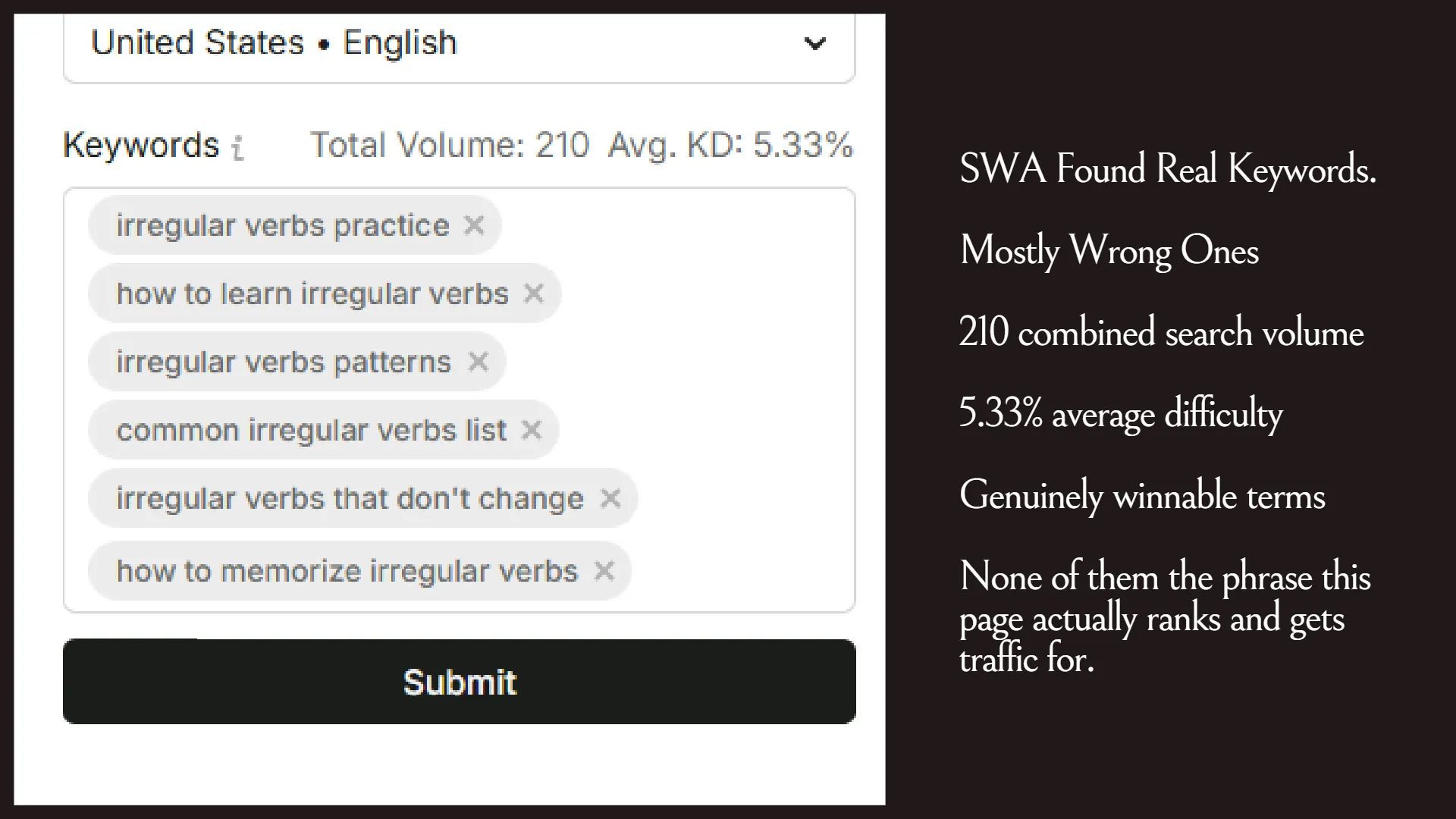
The first pass through SWA let it extract a target keyword on its own with no input from me. It came back with a list, “irregular verbs practice,” “how to learn irregular verbs,” “common irregular verbs list,” none of them the actual term the page was ranking for. A tool scoring the text has no way to know what a page is really winning on unless you tell it, and telling it requires already knowing the answer.
Giving SWA the Real Target
The second pass used the actual target, “irregular verbs learning method,” confirmed directly against real rank-tracking data. Based on this, the SWA gave my post a starting score of 73%. SEMrush’s own tool states an industry average of 60%. By its own measurement, this page was already outperforming the average before a single edit.
What SWA Recommended Anyway
Given the correct keyword and a score already above its own stated benchmark, the tool still generated a full list of changes. These weren’t changes that added anything new, they just simplified the language, but in doing so they stripped it of its uniqueness and some of its teaching value.
The below diff shows the proposed changes that wouldn’t have improved the meta data alignment to what Google already ranks this post for.
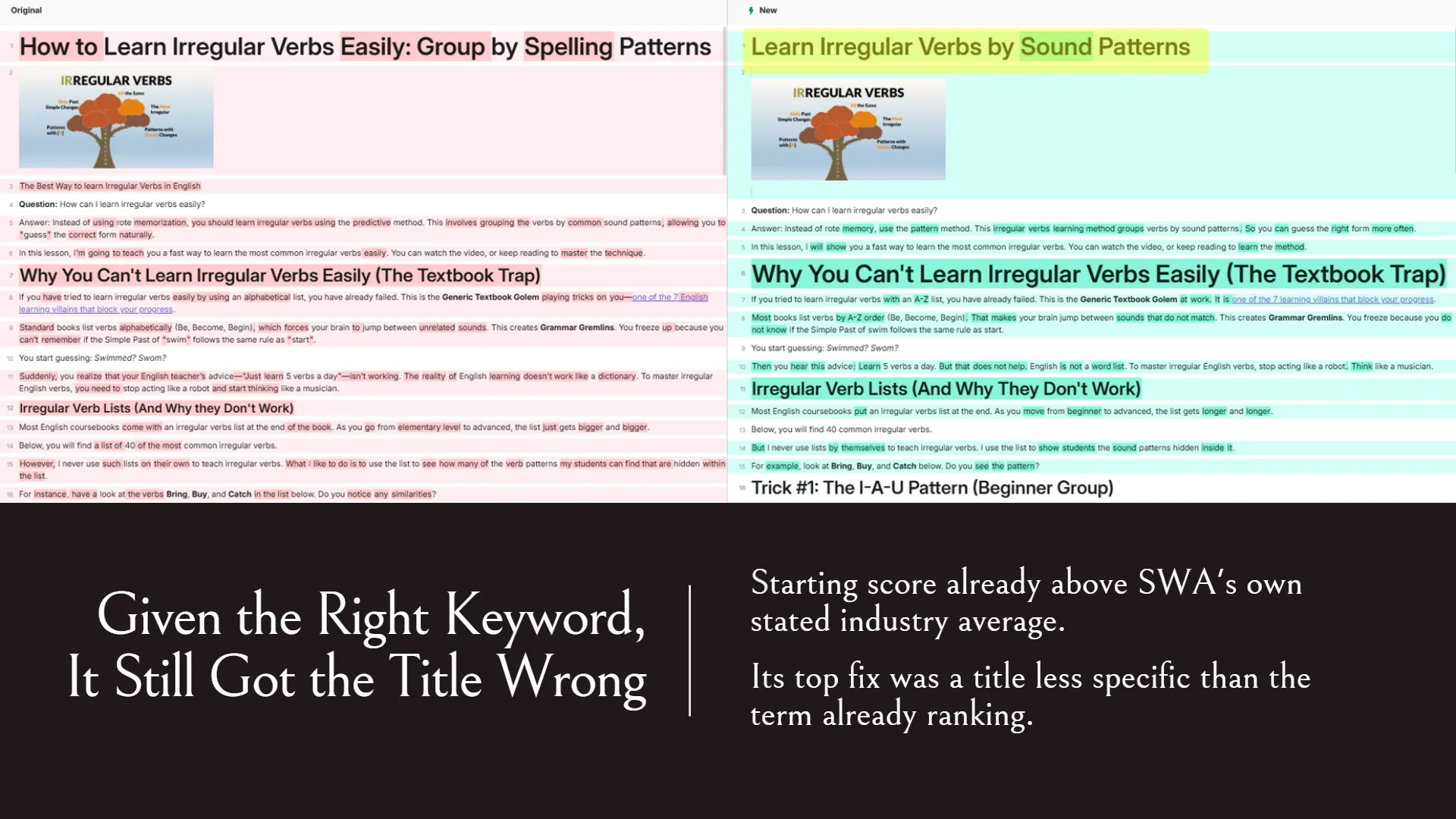
SWA failed to optimize the title to the given keyword target
Its top SEO recommendation was retitling the page to “Learn Irregular Verbs by Sound Patterns,” a phrase that’s actually less precise than “irregular verbs learning method,” the term the page already ranks for.
SWA couldn’t tell the difference between a grammatical mistake and a pedagogical device
The “Is it thinked?” example wasn’t a mistake. It’s a deliberate teaching device, showing a student exactly what wrong guessing sounds like. SWA didn’t just flag it as too casual. It deleted the entire passage, the surrounding “Confidence Crusher” framing which is a villain in my English learning site’s StoryBrand Framework, the teaching example itself, and the lead-magnet call to action sitting right beside it. None of it survived into the “optimized” version. Not a suggestion left for me to review. A silent removal.
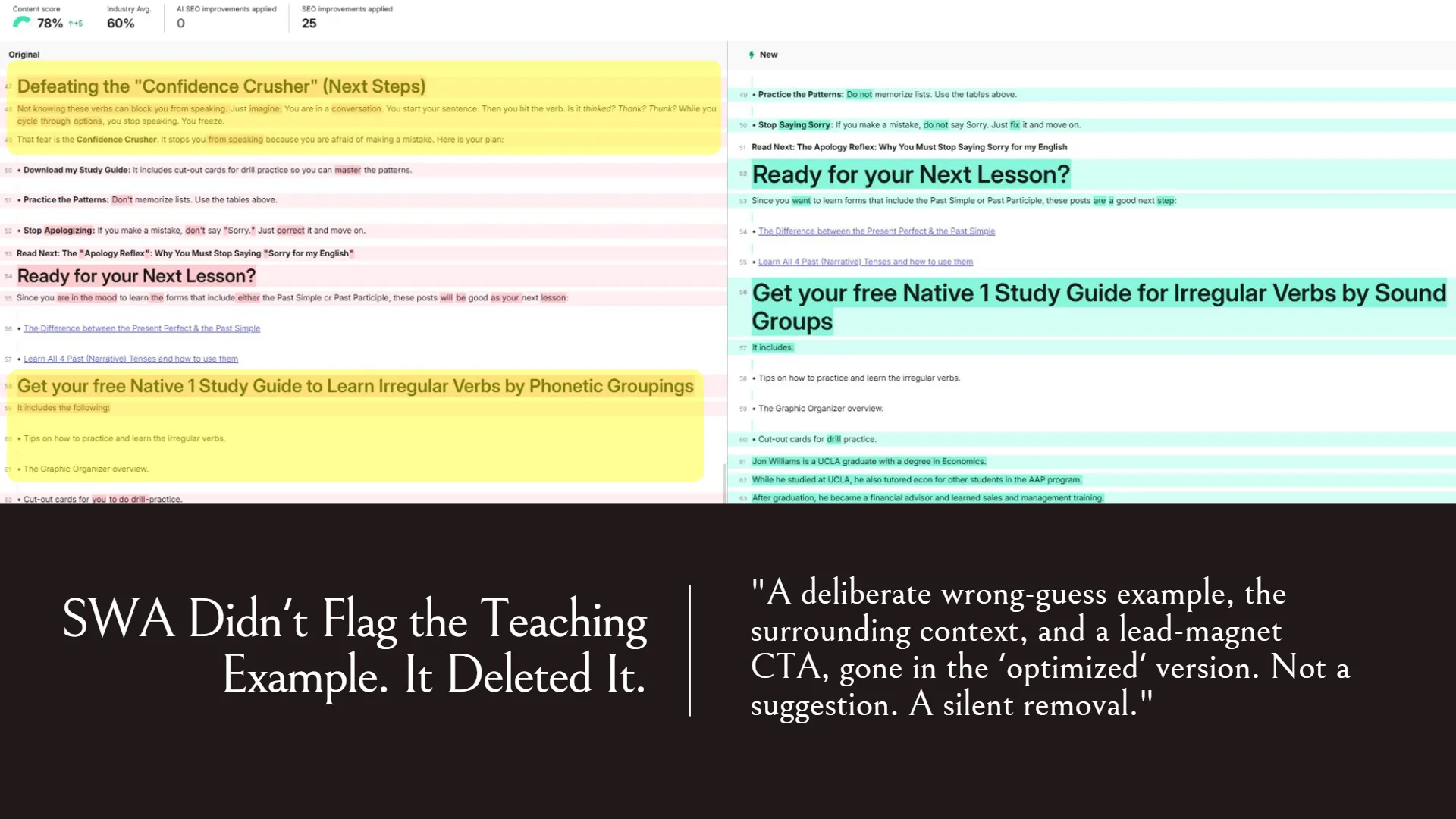
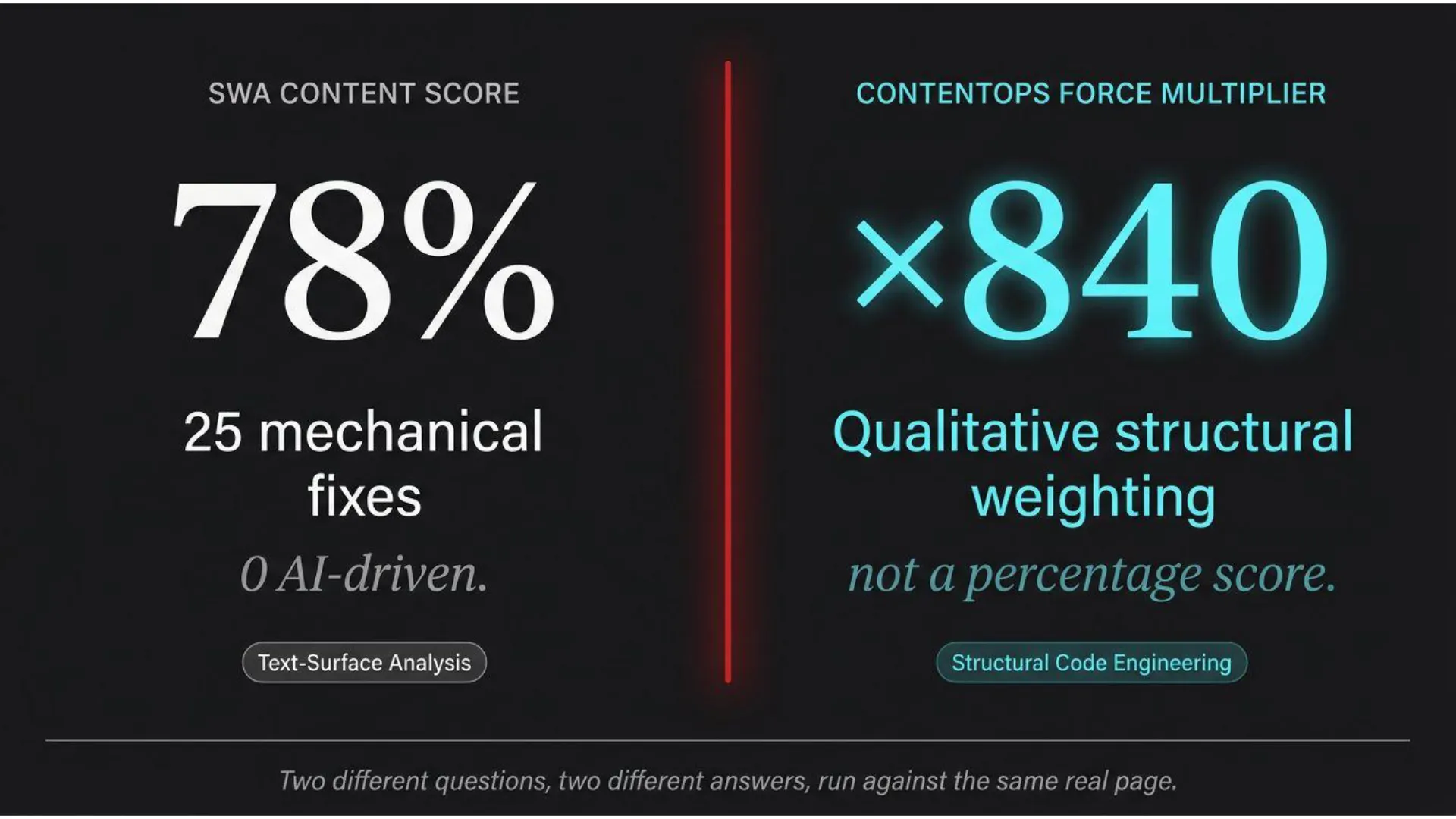
The result: a five-point gain from mechanical edits, none of them AI-driven:
After applying its own 25 recommended SEO fixes, the score moved from 73% to 78%. “AI SEO improvements applied” read zero. Every point of that gain came from the same kind of edit, tightened phrasing, a weaker title, a deleted passage, not from anything resembling structural understanding.
What ContentOps Found in the Same HTML
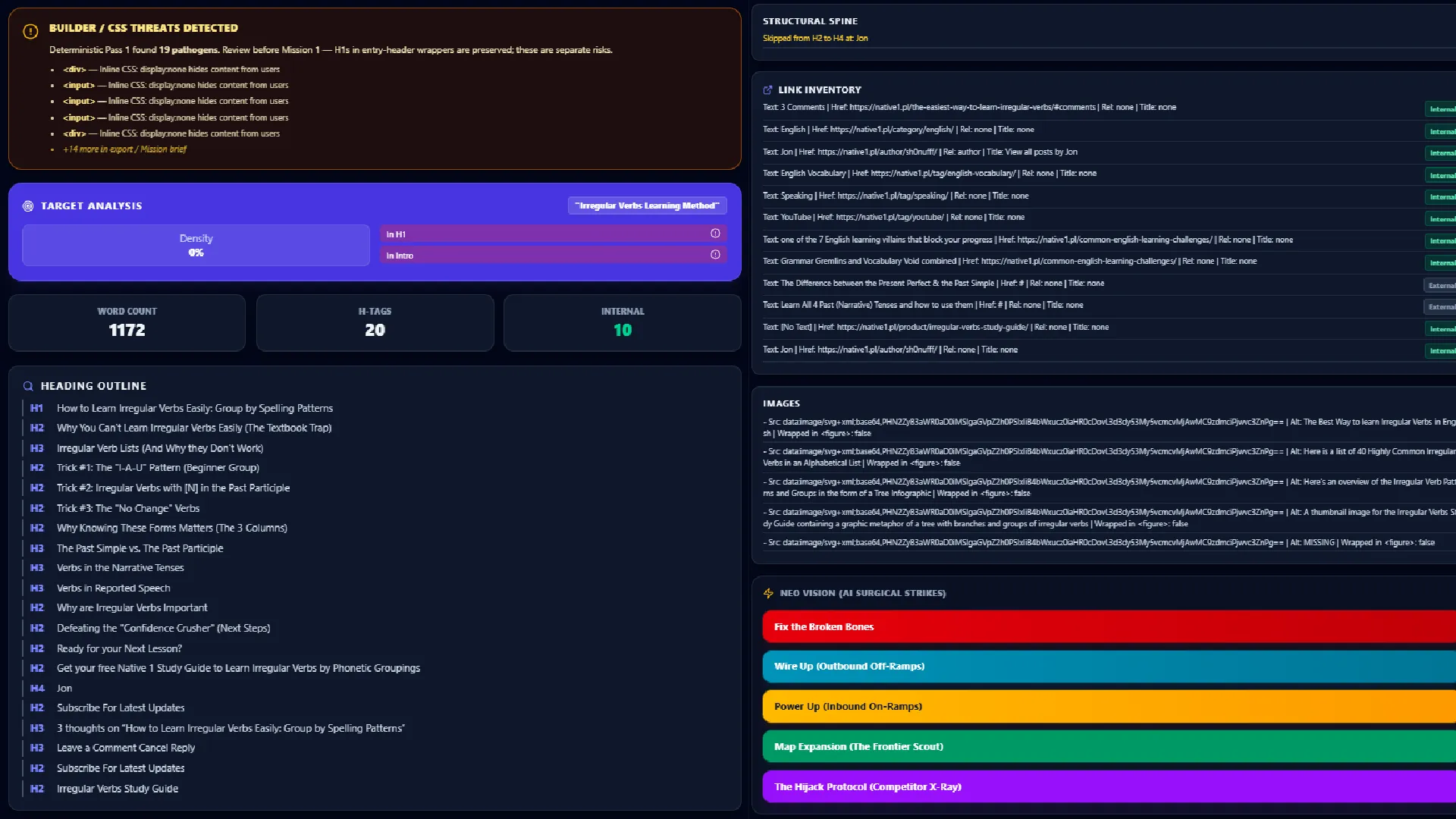
Running the same page’s raw HTML through Mission 1 surfaced a completely different set of problems, ones SWA’s scoring never touches at all:
- Target keyword density was zero, in both the H1 and the intro, on a page that ranks anyway.
- Seven parasitic headings from theme and plugin chrome were polluting the hierarchy,
- a comment-section H3,
- a subscribe-box H2 appearing twice,
- an author’s name marked as an H4.
- Two dead internal links pointing to
#. - Five images with no figure wrapping and conversational, non-didactic alt text.
None of this shows up in a text-layer score, because none of it is text. These were HTML-level problems that wouldn’t necessarily affect how the human reader understands the text, but how a crawler understands and ranks the post against the aligned or misaligned keyword.
The Proof that Structural Weight Beats Mechanical Compliance
Here’s the actual point of running this test on a real page instead of a hypothetical one. This post ranks on page one, generates real monthly traffic, and drives real signups, with a title that’s never matched its actual target keyword and a heading spine full of contamination SWA’s scoring has no way to see. That’s not an accident. It’s proof that structure carries more weight than mechanical compliance, sitting in a live account, not a claim made in the abstract.
The ContentOps Structural Approach
The ContentOps approach is that you code the clearest possible picture of your post’s main message into machine-readable structure – both HTML and JSON. That does not mean you code it yourself. As explained in our Pancake Mix Theory guide on HTML and JSON for non-coders, the app handles HTML encoding of your draft automatically with the HTML Wrapper. You wrap your content first, then you run the Audit Suite’s Missions 1 through 4 on that HTML. If you are reviving older content, press Control plus U on your live web page to view the raw code, copy and paste that HTML directly into the Audit Suite, and let the four missions go to work.
The JSON encoding is managed by the Topical Map. By building the map, the application holds the data in JSON. One of the best features is the simple action of exporting the map and dropping it into your LLM, turning on the stadium lights. The SEO application is that you can export sitewide schema and individual schema in JSON-LD format both with a single click.
Mission 1: The Microscope on Your Code
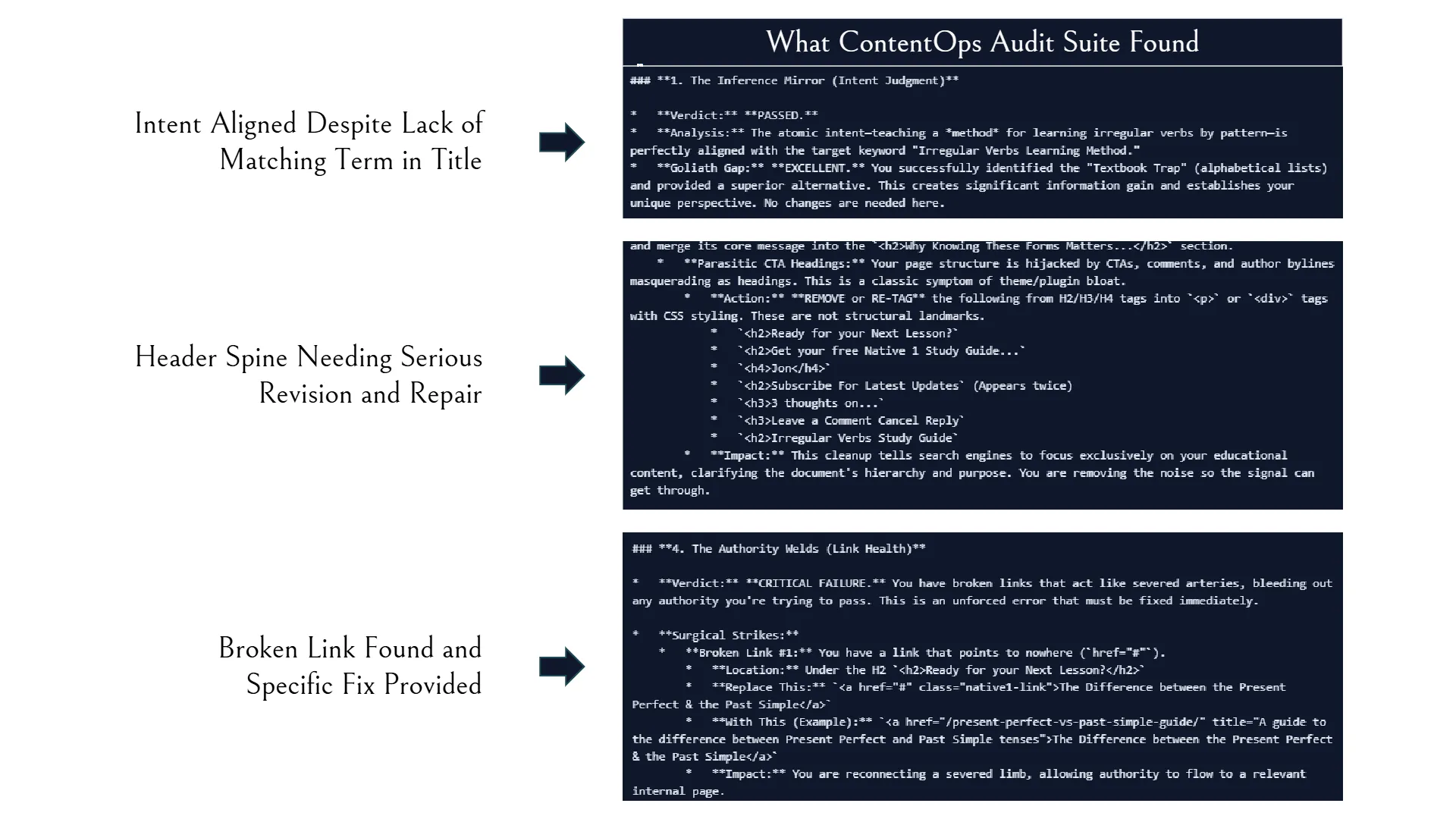
While surface tools count words in a rich-text editor, Mission 1 scans the structural code underneath the page to eliminate machine-reading friction. It audits six specific structural landmarks:
- Intent Alignment: Verifying that the atomic intent of your body text matches the target search query.
- Heading Spines: Ensuring H1 identity declarations and H2/H3 sub-headers form a clean, unbroken hierarchy.
- Code Pathogens and Saboteurs: Detecting hidden container bloat, malformed schema, and layout tags masquerading as content headings.
- Anchor Text Welds: Auditing internal link text to pass clear topical context to destination pages.
- Didactic Alt Text: Refactoring image metadata so visual assets teach search crawlers what the graphic means.
- Exact Fix-It Briefs: Every single pathogen found comes with an exact breakdown stating what to fix, where to find it in your code, and the precise code snippet to replace it with.
Mission 1 gives your single post the absolute clearest structure possible so search crawlers parse your message without compute tax. The below image shows snippets of the report we ran against our own Irregular Verbs post.
Missions 2 through 4: Combining HTML Diagnostics with Map Intelligence
Mission 1 fixes your single page structure. Missions 2 through 4 combine the Audit Suite’s code microscope with your Topical Map’s intelligence, ensuring your site’s overall authority is strong enough to assault competitive search terms.
Mission 2: Wiring Links Out (The Switchboard)
Mission 2 looks at your HTML draft on one side and your full Topical Map on the other like a telephone switchboard. It scans your draft’s text for concepts that connect to other pages on your site, recommending exact internal links out. Because it reads the raw HTML code rather than plain text, the AI sees exact tag placements, existing anchor links, and structural boundaries. In layman’s terms, plain text is just a bucket of words, whereas HTML shows the machine the actual doors and windows of your page so it welds links into the wall without breaking the house.
Mission 3: Powering Links In (The Inward Trade Route)
Mission 3 executes the exact opposite of Mission 2. It scans your entire Topical Map to identify older, published posts on your site that ought to be linking into your new draft. It analyzes the Big Ideas, target keywords, and semantic vocabulary of existing nodes, giving you exact link injection briefs to update your older articles so authority flows straight into your new piece from day one.
Mission 4: Inward-Out Map Expansion (Filling Entity Gaps)
Mission 4 mines your new HTML draft for un-anchored subtopics and shadow concepts, important ideas you mentioned in passing that do not yet have their own dedicated articles on your domain. It flags these entity gaps and prompts you to generate brand-new idea nodes directly for your Topical Map, ensuring your site’s cluster coverage grows systematically every time you write.
Mission 5: How ContentOps Overtakes Competitor Pages
When you want to outrank a high-performing competitor, you do not check their page to copy what they are doing. You check their page to discover what they are failing to do. That is how Mission 5 operates within the Audit Suite.
Mission 5 takes the raw HTML of a ranking competitor page and runs it directly against your Topical Map. Instead of telling you to match their keyword counts or copy their sub-headings, Mission 5 analyzes where their heading spine is vulnerable and identifies their un-anchored Shadow Concepts.
You then run Mission 4 against their content to extract those Shadow Concepts and publish them as dedicated child nodes on your own map. By creating targeted articles for the exact subtopics your competitor mentioned in passing, and linking them back into your main post, you construct superior topical density. You overtake competitor rankings not by keyword stuffing, but through internal linking trade routes and structural authority.
SEMrush Writing Assistant vs ContentOps: Workflow Breakdown
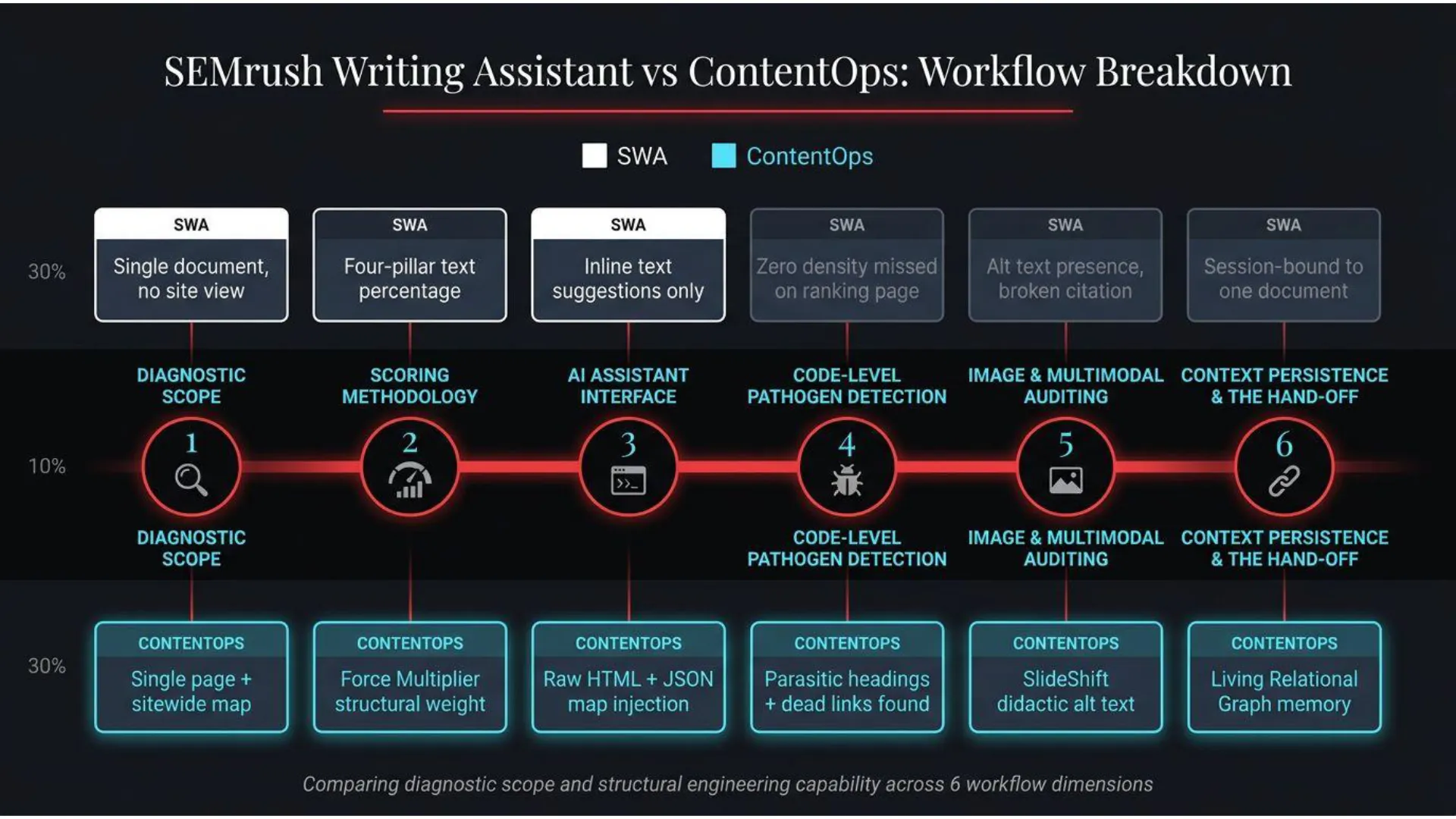
Every audit and optimization workflow moves through distinct stages. Here is what happens when you compare SEMrush’s Writing Assistant against ContentOps at each step.
Stage 1: Diagnostic Scope
How SWA Handles Scope
SWA scores a single document you paste or connect through its editor. It has no visibility into your site’s other pages, no concept of a sitewide relational graph.
How ContentOps Handles Scope
ContentOps pairs single-page code diagnostics with sitewide map cartography. It evaluates how your document functions on the page while checking how authority flows across your entire living domain map. The Audit Suite’s diagnostic captures the key semantic signals and alt-text that help AI and crawlers to clearly understand your post, what intent it satisfies, whether the supporting header and text structure supports that intent, and where authority is routed (anchor text and links).
Stage 2: Scoring Methodology
How SWA Scores Content
SWA scores across four pillars, readability, SEO term coverage, tone consistency, and originality, returning a live percentage against a stated industry average.
How ContentOps Scores Content
ContentOps uses The Force Multiplier Matrix. It assigns qualitative weights to structural landmarks like H1 identity declarations, heading spines, anchor text welds, and didactic alt text based on how much they change machine legibility. It doesn’t just mean more headers is better, but it encourages you to announce the important concepts, questions, solutions, and signposts as headers, authority routing anchor text, and didactic alt-text. This gives AI crawlers the clearest possible representation of your post.
Stage 3: AI Assistant Interface
How SWA Interfaces with AI
SWA surfaces inline suggestions directly in its editor, rewrite this sentence, add this term, adjust this tone, working from the text alone.
How ContentOps Interfaces with AI
ContentOps is a combination of built-in AI features like the Global Map Audit, Audit Suite Missions 1-5, HTML Wrapping, SlideShift, and individual schema node generation and context injections designed to be dropped into your own AI chats. ContentOps exports HTML-wrapped drafts alongside your living JSON Topical Map directly into AI chats. The map, every diagnostic and brief, and HTML wrapping are all exportable or copiable to clipboard for you to paste into AI chats. You’re already comfortable using AI, but you’ve been lacking the context and data injections to teach your AI about your business logic and big-picture content plan. It’s not designed to overwrite your voice but amplify it through a smarter, more context-enriched AI that you already use.
Stage 4: Code-Level Pathogen Detection
How SWA Inspects Code
SWA works from rendered text. Confirmed directly against our own live test, but it has no visibility into heading hierarchy contamination, dead links, or hidden structural bloat, all of which sat undetected on a page it scored at 73%.
How ContentOps Inspects Code
Mission 1’s Broken Bones Brief scans raw HTML code directly. It flags broken heading spines, missing schema arrays, and theme plugin conflicts before your post goes live.
Stage 5: Image and Multimodal Auditing
How SWA Audits Images
SWA’s own materials state it flags missing alt attributes with a warning. The specific page it cites as an explanation of how this works doesn’t actually describe the mechanism, and it offers no assessment of alt text quality, only its presence.
How ContentOps Audits Images
The Audit Suite’s Mission 1 not only checks whether the images carries alt-text or not, but it also comments on it’s efficacy. If your alt-text is purely generic description, that’s not good enough to move the needle on Google Image Search, which is getting more and more competitive. SlideShift refactors image decks into WebP assets with Didactic Alt Text. It turns decorative graphics into extractable teaching metadata that crawlers use to index your visuals in image search.
Stage 6: Context Persistence & The Hand-Off
How SWA Handles Audit Data
SWA scores are session-bound to the single document open in the editor. There’s no persistent, sitewide memory of your other content.
How ContentOps Handles Audit Data
ContentOps builds a Living Relational Graph that remembers context permanently. You build the Topical Map from the information that makes each node unique including your live URLs, semantic keywords, anchor text options, big idea, and manually-harvested internal links persist within each map node, ensuring your foundational data is 100% clean so the AI can treat your map as an absolute source of truth.
Once your map file is exported and dropped into your AI chats, it provides Stadium Lights across your whole domain field, allowing you to plan, write, and audit for domain authority continuously.
Pricing and Operational Value
SEMrush’s Writing Assistant is bundled inside the Content Toolkit, starting at $60 a month for the base plan. Full pricing and plan details show additional users at $20/month, lead generation at $90/month, and extra report bundles layered on top of the base tier.
The ContentOps Command Center combined with a standard AI subscription costs roughly $30 (ContentOps at $9.99 + whichever LLM Pro Plan you prefer to use) a month total, providing a complete structural audit engine, sitewide cartography memory, Mission 5 competitor overtake analysis, and multi-pass internal linking with fully disclosed pricing at every tier.
The Broader SEO Tool Stack Required and its Cost
Neither of these tools is meant to work in isolation. SWA’s four pillars and ContentOps’ Force Multiplier are both diagnostic instruments, they tell you what’s wrong and, in ContentOps’ case, exactly how to fix it. Neither one closes your keyword gaps, builds your backlink profile, or writes your first fifty posts for you. Getting a page from broken to ranking usually takes some combination of tools, a real content plan, and, for a lot of small businesses, at least some outside help to get over the line.
If you’re trying to figure out what that actually costs, an agency retainer, a DIY tool stack, or something in between, here’s our full breakdown of what SEO actually costs for a small business.
The Force Multiplier: ContentOps’ Answer to Surface Scoring
Instead of keyword frequency, ContentOps weights structural elements by how much they change machine legibility. The reasoning behind each tier is detailed in The Force Multiplier: How AI Actually Reads and Scores Your Content.
| Fix | Multiplier |
|---|---|
| Fixing a visibility-hiding pathogen | Infinite, zero to one visibility |
| H1 identity declaration | 100x |
| Each H2 with real semantic markers | 50x |
| Anchor text weld | 40x |
| Didactic alt text | 30x |
| Each H3 carrying real information gain | 25x |
| Structural pacing, H2/H3 depth | 25x |
| First 100 words, direct answer | 10x |
| Each semantic H4 | 10x |
These coefficients are qualitative weightings based on the ContentOps Sovereign Search Framework. They visualize the relative value of structural landmarks in machine-readable code.
Frequently Asked Questions
Does SEMrush’s Writing Assistant generate or audit schema markup?
No. SEMrush Writing Assistant operates strictly on text-layer optimization (readability, tone, surface keywords, and originality). Structured data and schema markup are handled separately in SEMrush’s technical Site Audit tool, meaning SWA cannot evaluate whether your document’s JSON-LD or schema arrays are properly configured.
Does SWA check internal link architecture and alt text quality?
SWA offers basic mechanical checks: it flags broken links and checks whether an image tag has an alt attribute present. However, it does not assess anchor text relevance, link authority routing, or whether alt text is didactic (teaching search crawlers what visual assets represent conceptually).
How does ContentOps differ from traditional text-layer editors like SWA?
While tools like SWA evaluate the rendered plain text in a rich-text editor, ContentOps inspects raw HTML and JSON structural code. ContentOps evaluates heading spine integrity, container bloat, anchor text welds, and sitewide relational mapping across your entire Topical Map rather than evaluating isolated document text.
Can a page outrank competitors without a exact-match target keyword title?
Yes. As demonstrated in our live audit test, a post with strong structural code, high topical authority, and clean heading hierarchy can rank on Page 1 even if the meta title and H1 do not perfectly match the winning keyword string. Machine-readable structure carries significantly more weight than surface keyword density.
Why do surface scoring tools alter teaching devices and brand tone?
Text-layer algorithms rely on statistical averages for sentence length and vocabulary complexity. They cannot distinguish an intentional pedagogical framing, a deliberate grammatical example, or a brand storyline from an error—often recommending edits that strip away the unique positioning and conversational value of the piece.
How do ContentOps Missions 1–5 work together?
Mission 1 acts as a code-level microscope on a single page’s HTML structure. Missions 2 and 3 manage internal link switchboards (outward and inward link flows), Mission 4 identifies entity gaps to expand your Topical Map, and Mission 5 audits competitor HTML to locate un-anchored shadow concepts you can capture to out-rank them.
The Symptomless Death Series & Diagnostic Transfer Hub
This comparison is one entry point into our broader diagnostic framework. If your content is failing in search, different operational issues require fundamentally different audit tools.
• If your post passed every compliance check but still sits buried: See our breakdown on Failure Checklists and the Greenlight Gaslighter to learn why passing on-page plugins does not guarantee search visibility.
• If you launched a strong post against high-authority sites and failed: Read Publishing Against a Goliath to see how building cluster authority brought our thesis from 0 impressions to Rank #1.
• If your page was quietly de-indexed without warning: Explore Symptomless Death and How to Revive Dead Content to follow the exact HTML strip protocol for resuscitating dead assets.
Evaluating Other SEO Audit Tools? The Full Audit Tools Paradigm
Instead of comparing tools on surface features, evaluate software based on your content’s current state, whether you are resurrecting dead posts, repairing underperforming articles, or launching against high-DA competitors. Content audits can occur on a single-page or across your whole site. See how ContentOps stacks up against both sets of Audit Tool Types.
See What Your Own Content Actually Scores
Run the free HTML Audit and see the Force Multiplier applied to a real page, not a surface text score.